
Send
Transfer crypto to any address or .vet domain — right from within BetterSwap.
Why Use BetterSwap's Send Feature
BetterSwap's Send feature streamlines crypto transfers with notable advantages over traditional wallets. It offers an all-in-one environment to trade and transfer without switching applications. The intuitive interface includes helpful features like percentage-based selection and cart functionality for batching transactions. With enhanced security measures and support for .vet domain names instead of lengthy addresses, BetterSwap makes sending crypto both simpler and safer.
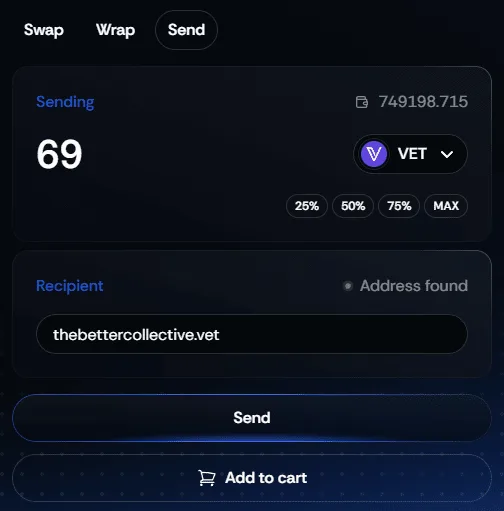
How to Send Crypto Using BetterSwap
Navigate to the Send Feature
Select Your Token
Enter the Amount
Specify the Recipient
0x...) or a .vet domain name.Review and Confirm
Optional: Add to Cart — Batch this send with other transactions using the shopping cart. Learn more →
Tips for Sending Crypto on BetterSwap
Tips
Verify Addresses
- Double-check the recipient's address before confirming.
- Consider sending a small test amount before large transfers.
Be Aware of Network Fees
- Each transaction incurs network fees.
- Plan transactions during lower network activity to minimize costs.
Use Max Button Carefully
- The "MAX" button will attempt to send your entire balance.
- Consider leaving a small amount for future fees.
Secure Your Connection
- Only use BetterSwap on secure networks.
- Verify you're on the authentic betterswap.io website.
Keep Records
- Save transaction IDs for your records (available on VechainStats).
- Use these to track or verify transactions if needed.
Monitor Your Transaction
- Track your transaction on VechainStats or VechainExplorer.
- Confirm when your transfer has been successfully processed.