
My Positions
View and manage your liquidity positions across all VeChainThor DEXs from a single interface.
What Are My Positions on BetterSwap
My Positions is a dedicated section of BetterSwap that displays information about pools where you've contributed assets. This interface presents data on your liquidity investments, including metrics, token quantities, and pool shares. As a unique feature, BetterSwap allows you to manage liquidity positions across multiple decentralized exchanges (DEXs) within the VeChainThor ecosystem, all from a single interface.
How to Use the My Positions Page
Accessing My Positions
- Navigate to betterswap.io/pool
- Select the "My Positions" tab from the available options
Viewing Active Pools
- The interface displays pools where liquidity has been provided
- Each entry shows the relevant token pair (e.g., VSEA/YEET) and the source DEX (e.g., Vexchange)
Available Metrics
- TVL (Total Value Locked) for each displayed pool
- 24h and 7d trading volumes as informational references
- Current APY (Annual Percentage Yield) figures
Pool Detail Access
- Users can select any pool to view additional information
- The detailed view displays data for both tokens in the pair
- The source DEX is shown below the token pair (e.g., "Vexchange")
Holdings Information
- Token quantities for each position
- Your specific token amounts (e.g., 94.99 VSEA and 683 YEET)
- Your percentage share of the total pool (e.g., 98.07%)
Liquidity Modification Options
- "Add liquidity" button for increasing positions
- "Remove liquidity" option for decreasing or exiting positions
- "Migrate liquidity" feature to transfer LP positions from other DEXs to BetterSwap
Multi-DEX Management
BetterSwap aggregates positions from all major VeChainThor DEXs. Access Settings by clicking the gear icon to configure which DEXs are included in your view.
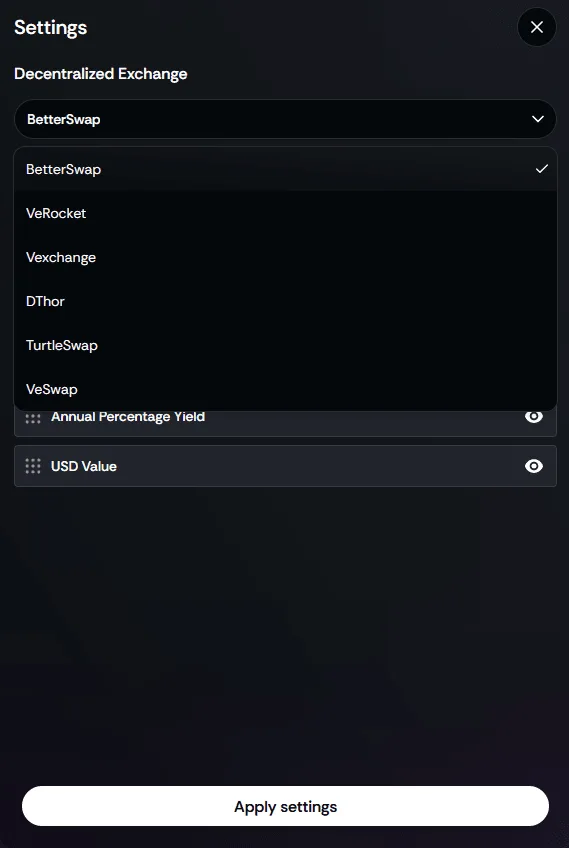
Supported DEXs include: BetterSwap, Vexchange, VeRocket, DThor, TurtleSwap, and VeSwap. You can also toggle visibility of APY and USD values from this settings panel.
Tips for Managing Your Liquidity
Tips
Position Monitoring
- Review your positions regularly to see their current status
- View performance data across different pools
Cross-DEX Management
- BetterSwap lets you view and manage liquidity across multiple VeChainThor DEXs
- The migration feature facilitates moving liquidity between different exchanges
Liquidity Considerations
- The interface allows for distributing liquidity across multiple pools
- Different pools have different characteristics that users may want to consider
Timing Awareness
- Market conditions can fluctuate, which may be relevant when interacting with pools
- The platform provides data that can be considered before making adjustments
Pool Share Information
- Your pool share percentage indicates your proportion of the total pool
- The platform shows how adding liquidity affects your pool share
Risk Information
- Each pool displays APY and volatility metrics for informational purposes
- Users often consider multiple factors when interacting with liquidity pools
Display Customisation
- Settings allow for tailoring the information displayed on the interface
- Users can choose which DEXs to include in their view and which metrics to display
Record Keeping
- It may be useful to maintain records of your liquidity activities
- Some users track additions and removals for their own documentation purposes
Price Divergence Data
- The interface displays price information for paired tokens
- Users can monitor this information at their discretion